
If you love LaTeX, you probably love its precision: clean formulas, beautiful spacing, elegant structure, and documents that feel professionally typeset. But there is one area where LaTeX-generated PDFs often need extra care: accessibility.
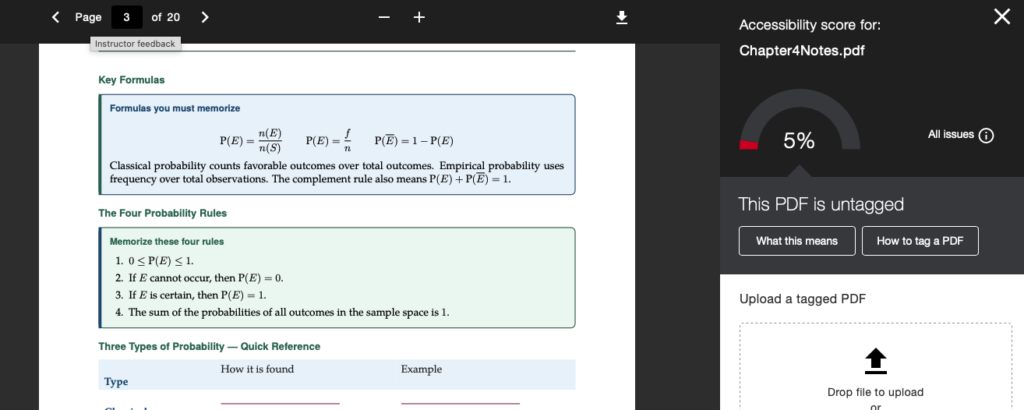
Many PDFs created from LaTeX are visually beautiful but may be difficult for screen readers and accessibility checkers. Common issues include missing document language, missing PDF title, untagged structure, inaccessible math, tables without structural headers, and figures without alt text.
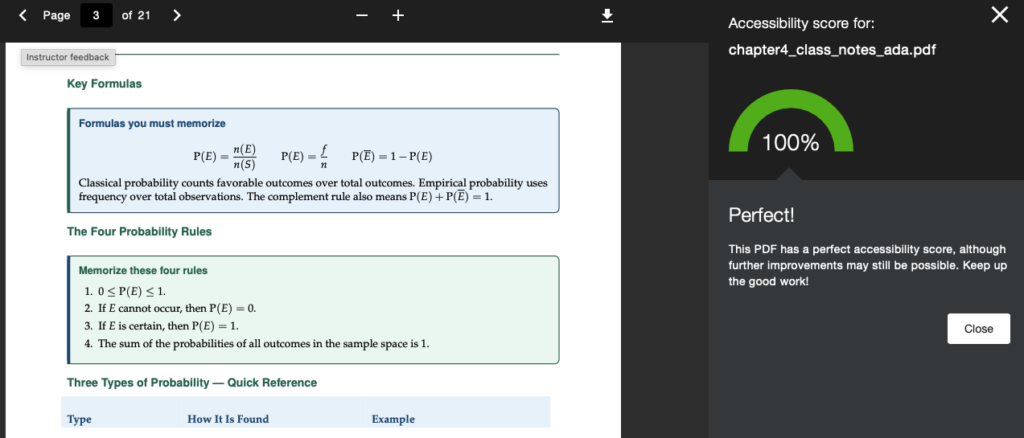
Here is a reusable prompt you can give to an AI coding assistant, a LaTeX assistant, or an accessibility-focused workflow to help convert a LaTeX document into a more ADA-compliant version.
Why This Matters
Accessibility is not just a technical requirement. It is an act of inclusion. For mathematics, statistics, engineering, computer science, and other technical subjects, accessibility can be especially challenging because formulas, tables, graphs, and symbolic notation need to be handled carefully. A PDF that “looks right” is not always a PDF that screen readers can navigate well. This prompt is designed to help improve:
- PDF metadata
- Document language
- Tagged PDF structure
- Accessible math
- Table headers
- Figure alt text
- Reading order
- Color contrast
- Validation checks
The Prompt
Update the attached LaTeX file to create an ADA/accessibility-compliant PDF version.

Create a new file named [original_name]_ada.tex and do not overwrite the original. The goal is to improve PDF accessibility for screen readers and accessibility checkers.

Requirements:

1. PDF Metadata
- Add a meaningful PDF title.
- Add author, subject, and keywords if appropriate.
- Set the PDF document language to en-US.
- Ensure the PDF catalog includes language metadata.
- Enable document title display in the PDF viewer.

Use something like:
\hypersetup{
  pdftitle={...},
  pdfauthor={...},
  pdfsubject={...},
  pdfkeywords={...},
  pdflang={en-US},
  pdfdisplaydoctitle=true
}

2. Tagging and Structure
- Load accessibility support in the preamble.
- Prefer:
  \usepackage[tagged,highstructure]{accessibility}
- Use a compatible engine. If the accessibility package fails under XeLaTeX/LuaLaTeX, make the ADA copy compile with pdfLaTeX and adjust font packages accordingly.
- Preserve the original design as much as possible, but prioritize accessibility.

3. Mathematical Accessibility
- Add math accessibility support:
  \usepackage[accsupp]{axessibility}
- Convert raw display math such as \[...\] and $$...$$ into equation-style environments.
- Avoid inline math inside section/subsection titles; rewrite headings in plain text when needed.
- Keep formulas readable and semantically clear.

4. Tables
- Inspect every table.
- Do not leave layout-only tables unless they are absolutely necessary.
- Convert unsupported table environments such as tabularx to accessibility-compatible tabular environments if needed.
- Every data table must have a clear header row.
- Mark header cells structurally, not only visually. Use \thead or an equivalent macro.
- Add table-header scope metadata if needed so PDF checkers do not report “tables missing headers.”
- Header cells should be tagged as TH, not TD, and should include column scope when possible.

5. Images and Figures
- Inspect every figure and image.
- Add meaningful alt text using the accessibility package’s \alt command.
- Alt text should describe the educational purpose of the image, not just its appearance.
- If a decorative image exists, mark or describe it appropriately.

Example:
\begin{figure}
  \centering
  \includegraphics[width=...]{...}
  \alt{Brief meaningful description of the figure}
  \caption{...}
\end{figure}

6. Links
- Ensure all links use meaningful link text.
- Avoid raw URLs as the only clickable text unless necessary.
- Make sure link color has sufficient contrast.

7. Headings and Reading Order
- Use proper section, subsection, and list structures.
- Avoid using visual formatting alone to imply structure.
- Ensure content flows logically in source order.

8. Color and Contrast
- Keep the document elegant, but ensure text/background contrast is readable.
- Do not rely on color alone to communicate meaning.

9. Validation
After editing, compile the ADA file to PDF.
Run at least two passes if references or metadata require it.

Verify:
- The PDF has a title.
- The PDF has language set to en-US.
- The PDF is tagged.
- Tables have structural headers.
- Figures have alt text where applicable.
- The LaTeX log has no fatal errors.

Useful checks:
pdfinfo [file].pdf
strings -a [file].pdf | grep "/Lang"
strings -a [file].pdf | grep "/Title"
strings -a [file].pdf | grep "/S /TH"
strings -a [file].pdf | grep "/Scope/Column"

Deliverables:
- Updated ADA LaTeX file: [original_name]_ada.tex
- Compiled ADA PDF: [original_name]_ada.pdf
- Brief summary of changes and validation results.

Important:
Do not only add accessibility packages. Actually inspect and fix metadata, language, headings, math, tables, figures, and validation warnings.
A Friendly Reminder
This prompt is not a magic wand, but it is a strong starting point. LaTeX accessibility is still evolving, especially for complex mathematical notation. After generating an accessible version, always test the PDF using tools such as Adobe Acrobat Accessibility Checker, PAC, screen readers, or your institution’s preferred accessibility workflow.
Still, every improvement matters. A tagged PDF with language, title, structured headings, accessible tables, and thoughtful alt text is far better than a beautiful but silent document.
For those of us who love mathematics and LaTeX, accessibility is another form of elegance: clarity not only for the eye, but for every learner.